|








| |
Manual Tool
Changes
  It
is not always required or desirable to use Automatic Tool changes when
running one part, a small run, or a part with only one size tool path.
Sometimes the programming time is not justified. In this case Tool Holders
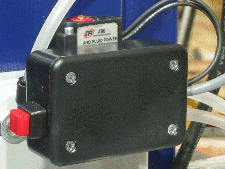
can be changed manually by pressing either the red button on the side of the Solenoid
Control Module or the red button on top of the air solenoid. This will actuate the drawbar and either release the
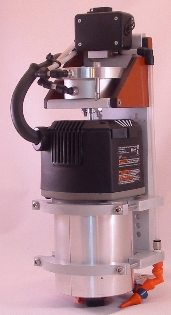
current Tool Holder or enable the Tool Changer to grab a new Tool Holder. (See the
video page for
a video which shows some manual tool changes).
Using this method, bits can be changed in just a few seconds anywhere you
can reach the Tool Changer. If It
is not always required or desirable to use Automatic Tool changes when
running one part, a small run, or a part with only one size tool path.
Sometimes the programming time is not justified. In this case Tool Holders
can be changed manually by pressing either the red button on the side of the Solenoid
Control Module or the red button on top of the air solenoid. This will actuate the drawbar and either release the
current Tool Holder or enable the Tool Changer to grab a new Tool Holder. (See the
video page for
a video which shows some manual tool changes).
Using this method, bits can be changed in just a few seconds anywhere you
can reach the Tool Changer. If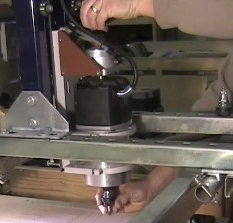 power is not applied to the system, a Tool
Holder can still be removed or inserted, as long as there is sufficient air
pressure, by pressing the red button on top of the
air solenoid. This operates the spool in the solenoid manually causing the
drawbar to extend and either release the current tool or accept the new tool. power is not applied to the system, a Tool
Holder can still be removed or inserted, as long as there is sufficient air
pressure, by pressing the red button on top of the
air solenoid. This operates the spool in the solenoid manually causing the
drawbar to extend and either release the current tool or accept the new tool.
| |
|